So you are an Software Engineer busy learning the nitty gritty details of the code, loops, function or arrays or be it DevOps engineer building CI/CD pipeline or the cyber guy making and breaking things continuously, there is high chances that you will deal with systems. Where else would you deploy your code or run the workload without the “system” ? and when I say system you will most of the time encounter a linux system. When we look into the linux system “Process in Operating System” is the most fundamental thing that we need to understand and save our life at the time of crisis (aka ‘Production Crash’). In this multi-part blog I’ll break down the concept of process, from theory to hard-core hands-on that will make sure that next time if you hit onto a hung system or crashed application at 2 AM, you don’t look puzzle. But lets start with our first question.
what is a Process in Operating System?
The bookish definition says “A program in exection is called process”. But what does it mean ? when you are at your laptop and double click a browser/any app, say chrome, it immediately pops up. You may also double click a calculator in your laptop or say a game. Before you double click, it’s (The executable binary) actually a program. When you double click, it becomes the “program in exection” or Process. Behind the execution scenes a lot of things happens before it finally occupies your screen and serves your further instructions. Among this “Lot of things” your program gets a slice of CPU, a slice of memory and many slice of lot of other things to use it solely by its own. Lets discover what happens behind the scene.
The Journey Begins: From Program to Process
Think of a program as a recipe in a cookbook—just a list of instructions on a shelf. But a process is like actually following the recipe: mixing ingredients, firing up the oven, and making a delicious dish.
The operating system makes this leap through a handful of carefully choreographed steps:
- Loader Reads the Program: When you double-click an app, the loader grabs the program’s code from disk.
- Allocates Memory: The OS chalk out some space in memory for the new process.
- Creates PCB (Process Control Block): A special “profile card” to keep track of everything about the new process.
- Sets Up Memory Sections: Arranges places in memory for the code, data, stack, and heap.
- Process Ready to Execute: With everything set, the process can join the queue to use the CPU.
Flowchart showing this transformation:

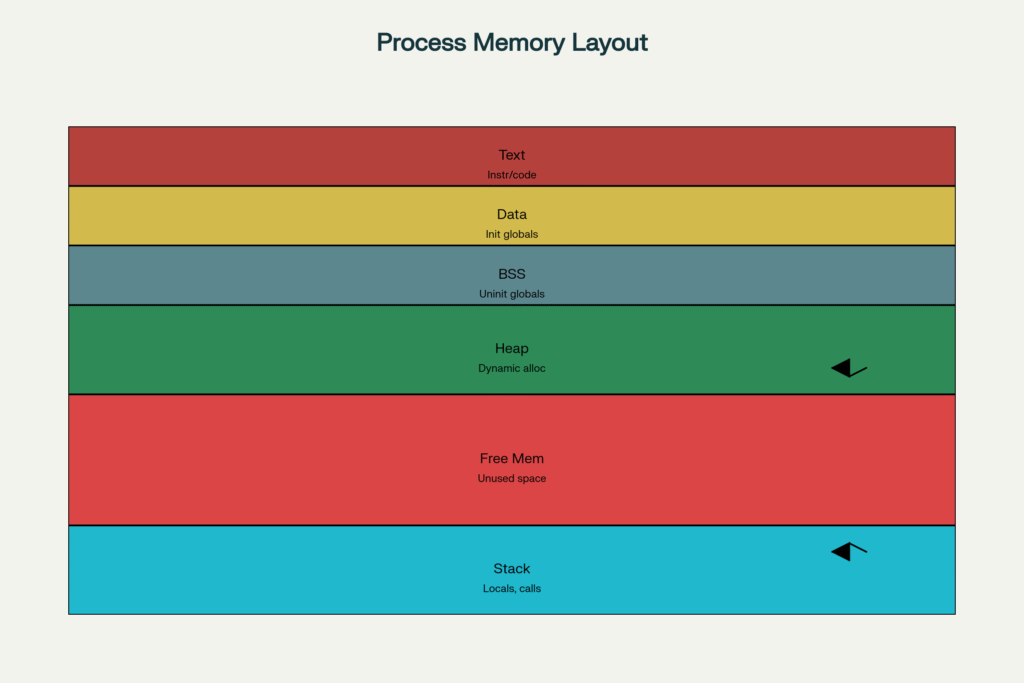
Under the Hood: How Memory Is Organized
Inside memory, each process is organized like a well-ordered apartment building—every room (section) has a special job:
- Text/Code Segment: Where the program’s instructions live (read-only).
- Data Segment: Holds variables that are initialized at startup.
- BSS Segment: Holds space for uninitialized variables, which are set to zero when the program starts.
- Heap: The playground for dynamic memory allocations (think of variables made with
mallocin C). - Stack: Manages function calls, local variables, and the return journey after a function is done.
Memory layout diagram:

Vertical memory layout of a typical process showing text, data, heap, and stack segments
Quick facts:
- The heap grows upward as more memory is needed during a process’s execution.
- The stack grows downward as functions are called and return.
But from double clicking to terminating every process has its own lifecycle. Lets explore that.
The Life of a Process: State Transitions
A process doesn’t just run from start to finish. It moves through several states, governed by what the operating system and the program itself are doing:
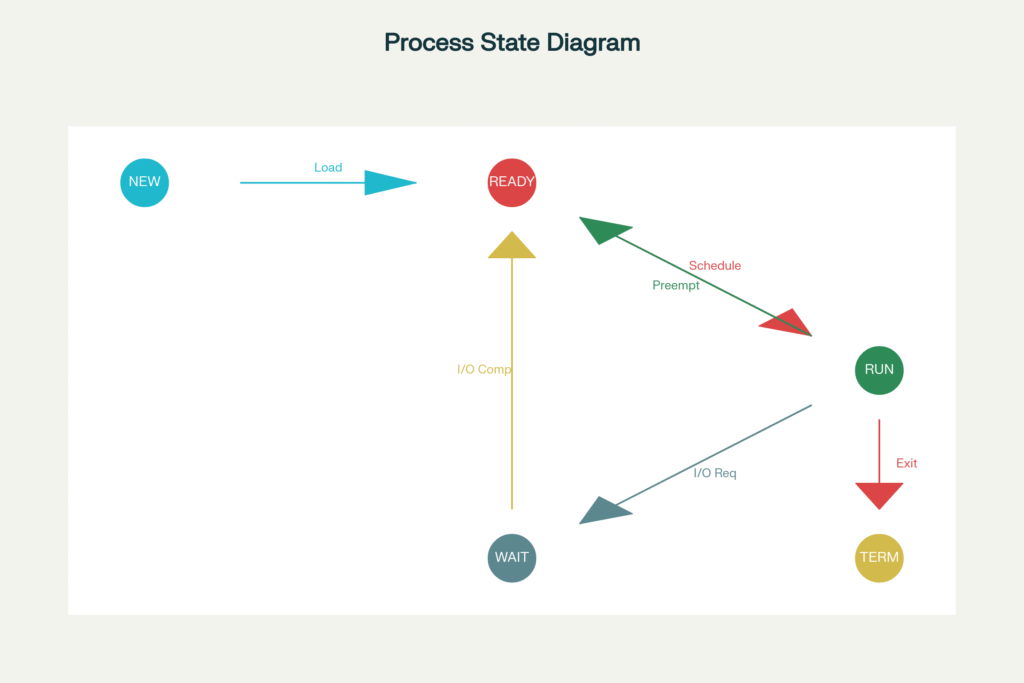
- New: Just created, waiting for setup.
- Ready: Waiting for its turn on the CPU.
- Running: Actively executing instructions.
- Waiting/Blocked: Paused for events (like waiting for data from the disk).
- Terminated: Done and waiting to be cleaned up.
Advanced: Efficiency with Demand Paging
Modern operating systems are pretty smart: they use demand paging to only load pieces of your program into memory when needed. This lets your computer launch big apps without cramming all their code into RAM at once, leaving space for multitasking and faster start times.
To Sum Up
When you launch an app, tons of magic happen in milliseconds:
- The OS reads your program from disk and allocates memory just for it.
- It sets up all the special sections—code, data, stack, heap—so everything has its place.
- It tracks and manages your process as it moves through creation, running, waiting, and finishing.
- By loading only what’s necessary, it keeps your computer quick and efficient.
The next time you click that icon on your desktop, you’ll know about the careful choreography and organization happening deep within your system! But Enough Talking. Let’s do it in action but in part 2.